
Showing posts with label DATABASE. Show all posts
Showing posts with label DATABASE. Show all posts
my sql timeout expired in vb.net using data adapter
Joining Multiple Tables with SQL Inner Join Statements
SELECT * FROM drivers, vehicles, locations
WHERE drivers.location = vehicles.location
AND vehicles.location = locations.location
WHERE drivers.location = vehicles.location
AND vehicles.location = locations.location
HOW TO TAKE CURRENT DATE AND TIME FROM MYSQL DATABASE
For date
query= "SELECT CURDATE() "
For date and time
query = "SELECT now() "
ForTIME
query = "SELECT Curtime()"
query= "SELECT CURDATE() "
For date and time
query = "SELECT now() "
ForTIME
query = "SELECT Curtime()"
QUERY FOR CURRENT DATE AND TIME INSERT IN MYSQL DATABASE
For date
query_ = "INSERT INTO TABLE(dp_name, dp_date)VALUE ('anuraj)', CURDATE() )"
For date and time
query = "INSERT INTO TABLE (dp_name, dp_date_time)VALUE ('anuraj)', now() )"
ForTIME
query_ = "INSERT INTO TABLE (dp_name, dp_time)VALUE ('anuraj)',curtime() )"
query_ = "INSERT INTO TABLE(dp_name, dp_date)VALUE ('anuraj)', CURDATE() )"
For date and time
query = "INSERT INTO TABLE (dp_name, dp_date_time)VALUE ('anuraj)', now() )"
ForTIME
query_ = "INSERT INTO TABLE (dp_name, dp_time)VALUE ('anuraj)',curtime() )"
Mysql query for date format
if you wanted to change the format of a MySQL date from YYYY-MM-DD to MM/DD/YYYY or DD/MM/YYYY format you can use the DATE_FORMAT() function as shown in the example below:
SELECT DATE_FORMAT(column_name, '%m/%d/%Y') FROM tablename
DIFFERENT DATETIME, DATE, AND TIMESTAMP FORMAT IN MY SQL
As a string in either
'YYYY-MM-DD HH:MM:SS'or'YY-MM-DD HH:MM:SS'format. A “relaxed” syntax is allowed: Any punctuation character may be used as the delimiter between date parts or time parts. For example,'98-12-31 11:30:45','98.12.31 11+30+45','98/12/31 11*30*45', and'98@12@31 11^30^45'are equivalent.As a string in either
'YYYY-MM-DD'or'YY-MM-DD'format. A “relaxed” syntax is allowed here, too. For example,'98-12-31','98.12.31','98/12/31', and'98@12@31'are equivalent.As a string with no delimiters in either
'YYYYMMDDHHMMSS'or'YYMMDDHHMMSS'format, provided that the string makes sense as a date. For example,'20070523091528'and'070523091528'are interpreted as'2007-05-23 09:15:28', but'071122129015'is illegal (it has a nonsensical minute part) and becomes'0000-00-00 00:00:00'.As a string with no delimiters in either
'YYYYMMDD'or'YYMMDD'format, provided that the string makes sense as a date. For example,'20070523'and'070523'are interpreted as'2007-05-23', but'071332'is illegal (it has nonsensical month and day parts) and becomes'0000-00-00'.As a number in either
YYYYMMDDHHMMSSorYYMMDDHHMMSSformat, provided that the number makes sense as a date. For example,19830905132800and830905132800are interpreted as'1983-09-05 13:28:00'.As a number in either
YYYYMMDDorYYMMDDformat, provided that the number makes sense as a date. For example,19830905and830905are interpreted as'1983-09-05'.
Stored Queries in access
Stored Queries in access
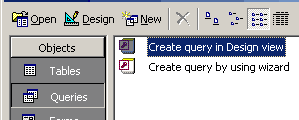
click Queries under the Objects tab on the left. Now double click 'Create query in Design View'.
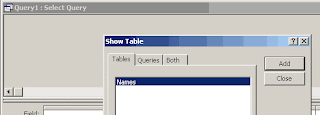
Two windows will open. Close the 'Show Tables' window by clicking the close button
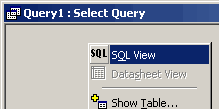
Now right click in the 'Query1 : Select Query' window and click 'SQL View' option as shown below.
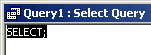
You should get a wide white window with something like following written on it's top left.
click Queries under the Objects tab on the left. Now double click 'Create query in Design View'.

Two windows will open. Close the 'Show Tables' window by clicking the close button

Now right click in the 'Query1 : Select Query' window and click 'SQL View' option as shown below.

You should get a wide white window with something like following written on it's top left.

What are the difference between DDL, DML and DCL commands?
DDL
Data Definition Language (DDL) statements are used to define the database structure or schema. Some examples:
* CREATE - to create objects in the database
* ALTER - alters the structure of the database
* DROP - delete objects from the database
* TRUNCATE - remove all records from a table, including all spaces allocated for the records are removed
* COMMENT - add comments to the data dictionary
* RENAME - rename an object
DML
Data Manipulation Language (DML) statements are used for managing data within schema objects. Some examples:
* SELECT - retrieve data from the a database
* INSERT - insert data into a table
* UPDATE - updates existing data within a table
* DELETE - deletes all records from a table, the space for the records remain
* MERGE - UPSERT operation (insert or update)
* CALL - call a PL/SQL or Java subprogram
* EXPLAIN PLAN - explain access path to data
* LOCK TABLE - control concurrency
DCL
Data Control Language (DCL) statements. Some examples:
* GRANT - gives user's access privileges to database
* REVOKE - withdraw access privileges given with the GRANT command
TCL
Transaction Control (TCL) statements are used to manage the changes made by DML statements. It allows statements to be grouped together into logical transactions.
* COMMIT - save work done
* SAVEPOINT - identify a point in a transaction to which you can later roll back
* ROLLBACK - restore database to original since the last COMMIT
* SET TRANSACTION - Change transaction options like isolation level and what rollback segment to use
Data Definition Language (DDL) statements are used to define the database structure or schema. Some examples:
* CREATE - to create objects in the database
* ALTER - alters the structure of the database
* DROP - delete objects from the database
* TRUNCATE - remove all records from a table, including all spaces allocated for the records are removed
* COMMENT - add comments to the data dictionary
* RENAME - rename an object
DML
Data Manipulation Language (DML) statements are used for managing data within schema objects. Some examples:
* SELECT - retrieve data from the a database
* INSERT - insert data into a table
* UPDATE - updates existing data within a table
* DELETE - deletes all records from a table, the space for the records remain
* MERGE - UPSERT operation (insert or update)
* CALL - call a PL/SQL or Java subprogram
* EXPLAIN PLAN - explain access path to data
* LOCK TABLE - control concurrency
DCL
Data Control Language (DCL) statements. Some examples:
* GRANT - gives user's access privileges to database
* REVOKE - withdraw access privileges given with the GRANT command
TCL
Transaction Control (TCL) statements are used to manage the changes made by DML statements. It allows statements to be grouped together into logical transactions.
* COMMIT - save work done
* SAVEPOINT - identify a point in a transaction to which you can later roll back
* ROLLBACK - restore database to original since the last COMMIT
* SET TRANSACTION - Change transaction options like isolation level and what rollback segment to use
How To Remove Access Database Password
Removing the Database Password
You can remove the password you have set for a database. Once a password
is set, the choice in the Tools, Security menu choice becomes Unset
Database Password. You will be prompted for the password; it is case-sensitive.
After you remove the database password, anyone has access to the database.
Let's remove the database password you set for databasename.mdb
Removing a database password.
- Close databasename.mdb. Open databasename.mdb in Exclusive Mode.
- Enter dbpassword. Click OK
- Choose Tools, Security, Unset Database Password.
Notice how this command has a different name now that the database
has a password set on it. - In the Password text box, type dbpassword.
- Click OK to accept the password and close the dialog box.
- Let's test this change. Close the database.
- Open databasename.mdb. You didn't need to enter a
database password to open the database.
How to Set Acces database password.
Setting a database password.
- Close databasename.mdb
- Click the Open Database button
- You need to use the Open dialog box. - Select databasename.mdb. Click on the arrow next to the Open
button. - Choose Open Exclusive to open the databasename.mdb
database with exclusive access. This gives you the sole access to
the database when you have it open. You can't set a database password
if it's in shared access mode. By choosing the Open Exclusive option,
you prevent other users from opening the database whilst you have
it open. - Choose Tools, Security, Set Database Password
to open the Set Database dialog box. - In the Password and Verify text boxes, type dbpassword.
Passwords are case-sensitive. - Click OK to accept the database password and
close the dialog box. - Close the database.
- Let's test the password to see if it works. Open databasename.mdb.
You must enter the database password to open the database. - Type dbpassword, and click OK. The database opens.
Database Restore in vb.net
Database Restore in vb.net
firstly you need to add reference to COM component: Microsoft DAO Object Library to your project.
Project menu -> Add Reference -> COM tab -> Navigate to "Microsoft DAO 3.x Object Library
====================================================
Microsoft DAO Object Library to your project
Imports System.IO
Public Class Form1
Private Sub Button1_Click(ByVal sender As System.Object, ByVal e As System.EventArgs) Handles Button1.Click
Dim sDBFile As String = Application.StartupPath + "/db_name.mdb"
Dim sBackUpFile As String = "E:\db_name.mdb"
'Restore the original file from the compacted file
If File.Exists(sBackUpFile) Then
File.Copy(sBackUpFile, sDBFile, True)
End If
End Sub
End Class
==============================================================
Easy method (simple method)
----------------------------------------------------------------------------------------------------
Imports System.IO
……………………………………………………………………………………………………………………………….
Public Class Form1
Private Sub Button1_Click(ByVal sender As System.Object, ByVal e As System.EventArgs) Handles Button1.Click
Dim sDBFile As String = Application.StartupPath + "/db_name.mdb"
Dim sBackUpFile As String = "E:\db_name.mdb ‘any path
If File.Exists(sBackUpFile) Then
FileCopy(sBackUpFile, sDBFile)
End If
End Sub
End Class
===============================================================
firstly you need to add reference to COM component: Microsoft DAO Object Library to your project.
Project menu -> Add Reference -> COM tab -> Navigate to "Microsoft DAO 3.x Object Library
====================================================
Microsoft DAO Object Library to your project
Imports System.IO
Public Class Form1
Private Sub Button1_Click(ByVal sender As System.Object, ByVal e As System.EventArgs) Handles Button1.Click
Dim sDBFile As String = Application.StartupPath + "/db_name.mdb"
Dim sBackUpFile As String = "E:\db_name.mdb"
'Restore the original file from the compacted file
If File.Exists(sBackUpFile) Then
File.Copy(sBackUpFile, sDBFile, True)
End If
End Sub
End Class
==============================================================
Easy method (simple method)
----------------------------------------------------------------------------------------------------
Imports System.IO
……………………………………………………………………………………………………………………………….
Public Class Form1
Private Sub Button1_Click(ByVal sender As System.Object, ByVal e As System.EventArgs) Handles Button1.Click
Dim sDBFile As String = Application.StartupPath + "/db_name.mdb"
Dim sBackUpFile As String = "E:\db_name.mdb ‘any path
If File.Exists(sBackUpFile) Then
FileCopy(sBackUpFile, sDBFile)
End If
End Sub
End Class
===============================================================
Database Backup in vb.net
Database Backup in vb.net
firstly you need to add reference to COM component: Microsoft DAO Object Library to your project.
Project menu -> Add Reference -> COM tab -> Navigate to "Microsoft DAO 3.x Object Library
====================================================
Microsoft DAO Object Library to your project
Imports System.IO
Public Class Form1
Private Sub Button1_Click(ByVal sender As System.Object, ByVal e As System.EventArgs) Handles Button1.Click
Dim sDBFile As String = Application.StartupPath + "/db_name.mdb"
Dim sBackUpFile As String = "E:\db_name.mdb"
' Backup *.mdb database
If File.Exists(sDBFile) Then
Dim db As New DAO.DBEngine
'CompactDatabase has two parameters, creates a copy of compact DB at the Destination path
db.CompactDatabase(sDBFile, sBackUpFile)
End If
End Sub
End Class
===============================================================
Easy method (simple method)
----------------------------------------------------------------------------------------------------
Imports System.IO
……………………………………………………………………………………………………………………………….
Public Class Form1
Private Sub Button1_Click(ByVal sender As System.Object, ByVal e As System.EventArgs) Handles Button1.Click
Dim sDBFile As String = Application.StartupPath + "/db_name.mdb"
Dim sBackUpFile As String = "E:\db_name.mdb
If File.Exists(sDBFile) Then
FileCopy(sDBFile, sBackUpFile
End If
End Sub
End Class
===============================================================
firstly you need to add reference to COM component: Microsoft DAO Object Library to your project.
Project menu -> Add Reference -> COM tab -> Navigate to "Microsoft DAO 3.x Object Library
====================================================
Microsoft DAO Object Library to your project
Imports System.IO
Public Class Form1
Private Sub Button1_Click(ByVal sender As System.Object, ByVal e As System.EventArgs) Handles Button1.Click
Dim sDBFile As String = Application.StartupPath + "/db_name.mdb"
Dim sBackUpFile As String = "E:\db_name.mdb"
' Backup *.mdb database
If File.Exists(sDBFile) Then
Dim db As New DAO.DBEngine
'CompactDatabase has two parameters, creates a copy of compact DB at the Destination path
db.CompactDatabase(sDBFile, sBackUpFile)
End If
End Sub
End Class
===============================================================
Easy method (simple method)
----------------------------------------------------------------------------------------------------
Imports System.IO
……………………………………………………………………………………………………………………………….
Public Class Form1
Private Sub Button1_Click(ByVal sender As System.Object, ByVal e As System.EventArgs) Handles Button1.Click
Dim sDBFile As String = Application.StartupPath + "/db_name.mdb"
Dim sBackUpFile As String = "E:\db_name.mdb
If File.Exists(sDBFile) Then
FileCopy(sDBFile, sBackUpFile
End If
End Sub
End Class
===============================================================
MS Access Different Select - Where Query
Operator | Description | Example |
= | All data that Equals value | SELECT * from Member Payment WHERE Payment Amount=50 |
≪> | All data that does not equal value | SELECT * from Member Payment WHERE Payment Amount ≪> 50 |
> | All data that is Greater than the value | SELECT * from Gym Members WHERE Member Expire > 12/1/2006 |
≪ | All data that is less than the value | SELECT * from Gym Members WHERE Member Expire ≪ 12/1/2006 |
>= | All Data that is greater than or Equal to the value | SELECT * from Gym Members WHERE Member Expire >= 12/1/2006 |
≪= | All data that is Less than or equal to the value | SELECT * from Gym Members WHERE Member Expire <= 12/1/2006 |
AND, OR | Used to Separate values being compared | SELECT * from GymService WHERE ServiceCost = 20 OR ServiceCost = 50 |
BETWEEN | Between two values including those two values | SELECT * FROM GymMembers WHERE MemberExpire Between 12/1/2006 And 2/1/2007 |
LIKE | Used to search for a string of alphabets, numbers, or other characters | SELECT * from GymMembers WHERE MemberName LIKE 'Jackie Smyth' OR MemberName LIKE 'Sid Harris' |
IN | a Used to search for a set of values | SELECT * from GymMembers WHERE MemberID IN (1,5,10,15,20) |
Important queryes for sql database
How to create database?
create database databasename
How to create table?
Create table tablename(tablefieldname varchar(50),tablefieldname1 varchar(50),tablefieldname2 varchar(50))
How to alter table?
alter table tablename add tablefieldname3 int
How to read from table?
select * from tablename
How to insert data to table?
insert into tablename values ('ANURAJ S','Chathannoor','9447990404')
How to update data from table?
update tablename set tablefieldname3=5 where ptablefieldname='ANURAJ S'
How to delete data from table?
delete from tablenamewhere ptablefieldname='ANURAJ S'
how to join 2 tables?
select * from tablename a INNER JOIN tablename1 b on a.tablefieldname=b.tablefieldname2
in this tablefieldname and tablefieldname2 contain common values and they are in same format
create database databasename
How to create table?
Create table tablename(tablefieldname varchar(50),tablefieldname1 varchar(50),tablefieldname2 varchar(50))
How to alter table?
alter table tablename add tablefieldname3 int
How to read from table?
select * from tablename
How to insert data to table?
insert into tablename values ('ANURAJ S','Chathannoor','9447990404')
How to update data from table?
update tablename set tablefieldname3=5 where ptablefieldname='ANURAJ S'
How to delete data from table?
delete from tablenamewhere ptablefieldname='ANURAJ S'
how to join 2 tables?
select * from tablename a INNER JOIN tablename1 b on a.tablefieldname=b.tablefieldname2
in this tablefieldname and tablefieldname2 contain common values and they are in same format

REMOVE TIME FROM DATE IN SQL
The following conversion options are available for sql datetime format with century:
select convert(char, getdate(), 100) -- mon dd yyyy hh:mmAM (or PM) FROM TABLENAME
select convert(char, getdate(), 101) -- mm/dd/yyyy
select convert(char, getdate(), 102) -- yyyy.mm.dd
select convert(char, getdate(), 103) -- dd/mm/yyyy
select convert(char, getdate(), 104) -- dd.mm.yyyy
select convert(char, getdate(), 105) -- dd-mm-yyyy
select convert(char, getdate(), 106) -- dd mon yyyy
select convert(char, getdate(), 107) -- mon dd, yyyy
select convert(char, getdate(), 108) -- hh:mm:ss
select convert(char, getdate(), 109) -- mon dd yyyy hh:mm:ss:mmmAM (or PM)
select convert(char, getdate(), 110) -- mm-dd-yyyy
select convert(char, getdate(), 111) -- yyyy/mm/dd
select convert(char, getdate(), 112) -- yyyymmdd
select convert(char, getdate(), 113) -- dd mon yyyy hh:mm:ss:mmm
select convert(char, getdate(), 114) -- hh:mm:ss:mmm(24h)
select convert(char, getdate(), 120) -- yyyy-mm-dd hh:mm:ss(24h)
select convert(char, getdate(), 121) -- yyyy-mm-dd hh:mm:ss.mmm
select convert(char, getdate(), 126) -- yyyy-mm-ddThh:mm:ss.mmm
select convert(char, getdate(), 100) -- mon dd yyyy hh:mmAM (or PM) FROM TABLENAME
select convert(char, getdate(), 101) -- mm/dd/yyyy
select convert(char, getdate(), 102) -- yyyy.mm.dd
select convert(char, getdate(), 103) -- dd/mm/yyyy
select convert(char, getdate(), 104) -- dd.mm.yyyy
select convert(char, getdate(), 105) -- dd-mm-yyyy
select convert(char, getdate(), 106) -- dd mon yyyy
select convert(char, getdate(), 107) -- mon dd, yyyy
select convert(char, getdate(), 108) -- hh:mm:ss
select convert(char, getdate(), 109) -- mon dd yyyy hh:mm:ss:mmmAM (or PM)
select convert(char, getdate(), 110) -- mm-dd-yyyy
select convert(char, getdate(), 111) -- yyyy/mm/dd
select convert(char, getdate(), 112) -- yyyymmdd
select convert(char, getdate(), 113) -- dd mon yyyy hh:mm:ss:mmm
select convert(char, getdate(), 114) -- hh:mm:ss:mmm(24h)
select convert(char, getdate(), 120) -- yyyy-mm-dd hh:mm:ss(24h)
select convert(char, getdate(), 121) -- yyyy-mm-dd hh:mm:ss.mmm
select convert(char, getdate(), 126) -- yyyy-mm-ddThh:mm:ss.mmm
REMOVE TIME FROM DATE IN ACCESS DATABASE
Getting Only the Date Part of a Date/Time Stamp in ACCESS
"select datefield from tablename"
06/15/2007 12:00:00 PM
"Select FORMAT(datefield, 'd /MM/ yyyy') as datefield from tablename"
15/06/2007
"Select FORMAT(datefield, 'MM /d / yyyy') as datefield from tablename"
06/15/2007
"select datefield from tablename"
06/15/2007 12:00:00 PM
"Select FORMAT(datefield, 'd /MM/ yyyy') as datefield from tablename"
15/06/2007
"Select FORMAT(datefield, 'MM /d / yyyy') as datefield from tablename"
06/15/2007
Subscribe to:
Posts (Atom)